
Sample File & Results (Time Entries)
Mosaic's Time Entries import lets you bring historical or bulk time from a spreadsheet — logging hours against the right person, project, phase, and date all at once. This guide covers how to fill out your file and what the time looks like in Mosaic afterward.
Who can do this? Time-entry import is admin-only. If you don't see the import option, ask a workspace admin.
Throughout this guide we use one example file with eight time entries across several people and projects — including a Time Off day — to show how everything fits together.
Download the templateStart from the sample file attached to this page, then replace the example rows with your own data.
Before you start: this import references existing data
Unlike the project or member import, a timesheet import doesn't create people or projects — it logs time against things that already exist. Before importing, make sure:
- Every person in the file is already a member of your Mosaic team (matched by email).
- Every project, phase, and work category already exists in Mosaic (matched by name / ref#).
If a member or project can't be matched, that row is flagged.
What one import creates
Each row logs one time entry — a block of hours for one person, on one date, against one project (and optionally a phase and work category). A row can also carry a description, a billable flag, an hourly rate, and invoice hours.
How the file is structured
| Requirement | Value |
|---|---|
| File types | .csv, .xlsx, or .tsv |
| Max file size | 20 MB |
| First row | Column headers |
| Each row | One time entry |
Each row stands alone — one person, one day, one block of hours. The same person appears on as many rows as they have entries.

Column reference
Date, Employee Name, Employee Email, Project, and Hours are required. The rest are optional or depend on how the project is set up.
Who & when (required)
| Column | Required? | Format / accepted values | Example |
|---|---|---|---|
| Date | ✅ Always | YYYY-MM-DD | 2026-07-06 |
| Employee Name | ✅ Always | First and last name, with a space | Sarah Chen |
| Employee Email | ✅ Always | The email of an existing Mosaic member | [email protected] |
| Hours | ✅ Always | A non-negative number | 8 |
Where the time goes
| Column | Required? | Format / accepted values | Example |
|---|---|---|---|
| Portfolio | Optional | Must match the project's portfolio (blank for Time Off) | Commercial Projects |
| Project | ✅ Always | An existing project name (or Time Off) | Oakridge Office Fit-Out |
| Project Ref# | Conditional | Required when two projects share the same name | 210075 |
| Phase | Optional* | An existing phase name, or Main Project Phase | Design Development |
| Phase Ref# | Optional | The phase's identifier in Mosaic | 100 |
| Work Category | Optional* | An existing work category on that phase | Interior Layout |
| Work Category Ref# | Optional | The work category's identifier | C10 |
*If a project or phase already has phases / work categories defined, a matching value is required — see the rules below.
Details (optional)
| Column | Required? | Format / accepted values | Example |
|---|---|---|---|
| Billable | Optional | true / false (default true) | true |
| Hourly Rate | Optional | A number | 150 |
| Invoice Hours | Optional | A non-negative number | 8 |
| Description | Optional | Free text — what the time was for | Schematic layouts for level 2 |
Rules that keep your file valid
-
Dates must be
YYYY-MM-DD(e.g.2026-07-06). Any other format is rejected.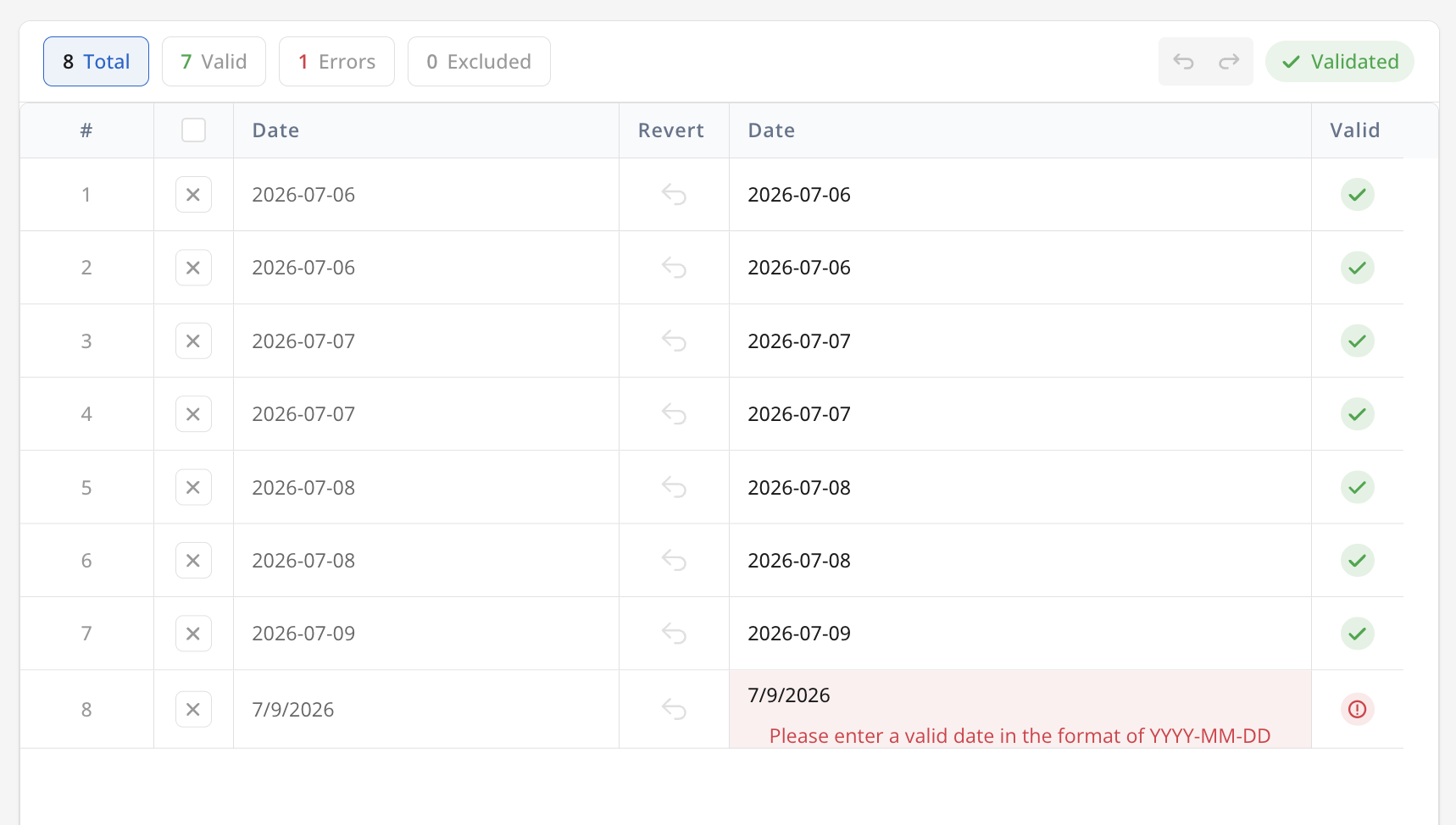
-
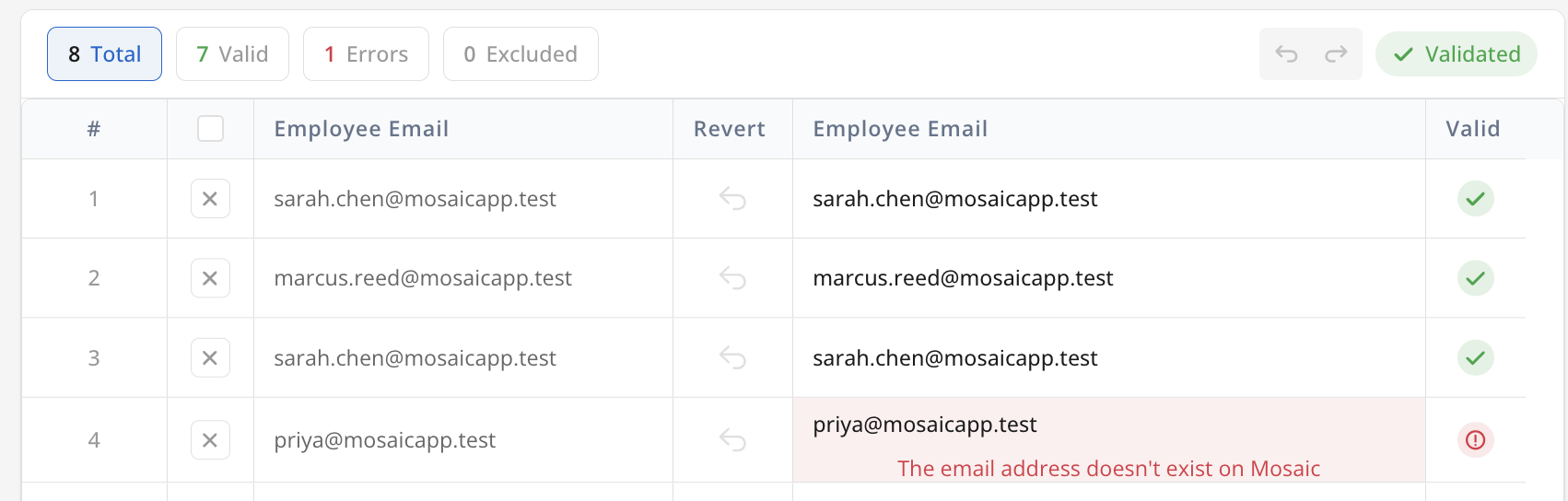
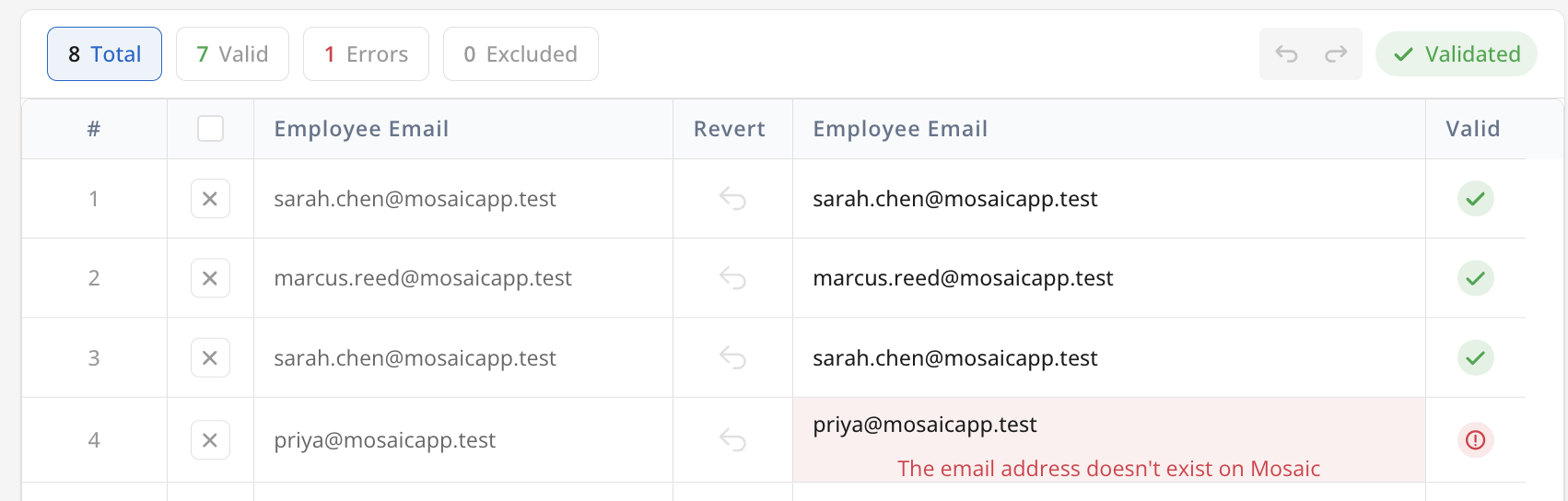
The email must belong to an existing member — otherwise the row can't be matched.
-
Employee Name needs a space between first and last name.
-
Hours are required and non-negative. Invoice Hours, if used, must also be non-negative.
-
The project must exist. If two projects share a name, add the Project Ref# to say which one.
-
Match the project's structure. If the project has real phases, each row needs a Phase (or
Main Project Phase). If a phase has work categories, each row for that phase needs a matching Work Category. -
Time Off is special. For the built-in Time Off project, leave Portfolio and Project Ref# blank. For every other project, the Portfolio is required.
What your import looks like in Mosaic
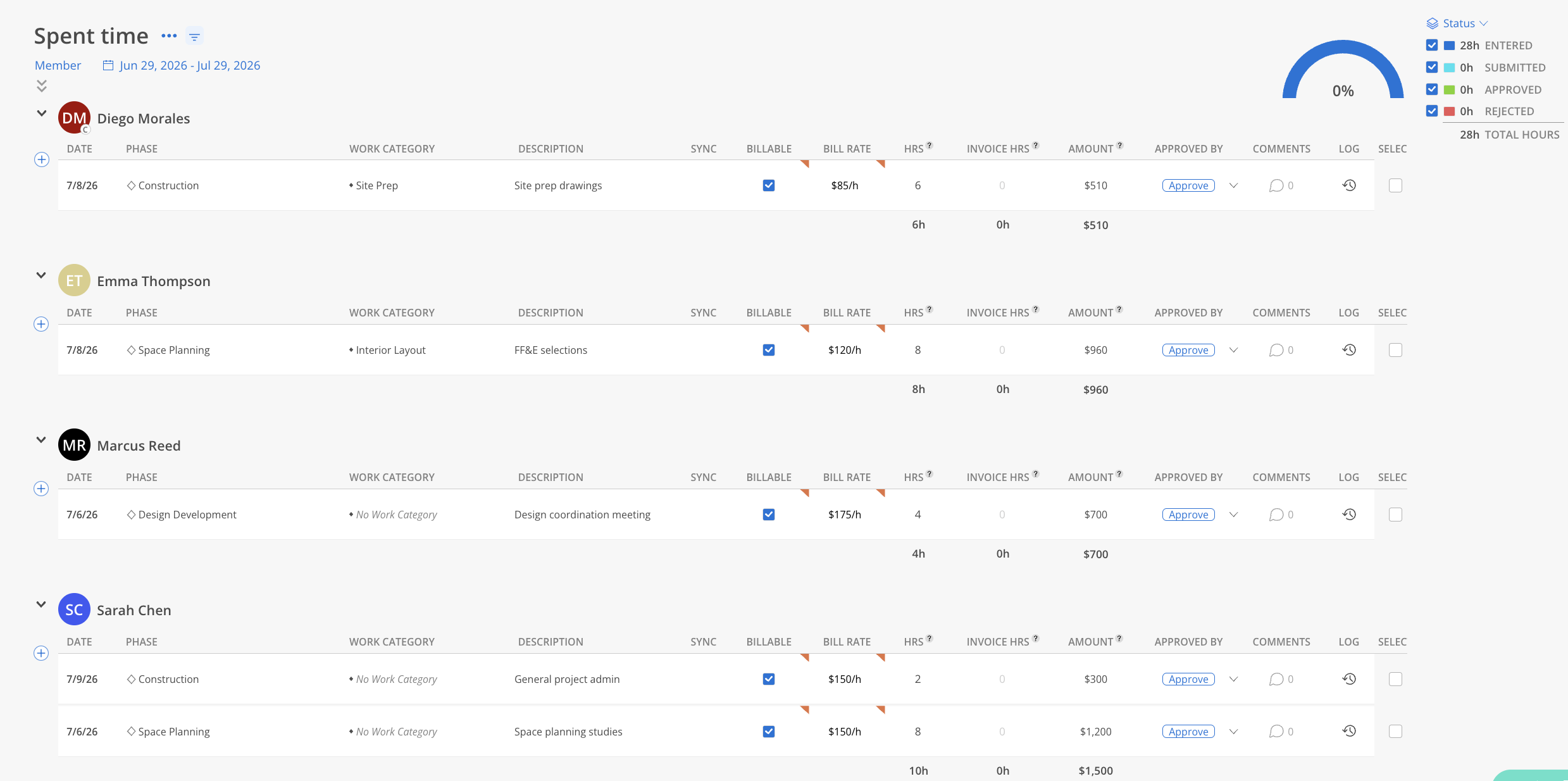
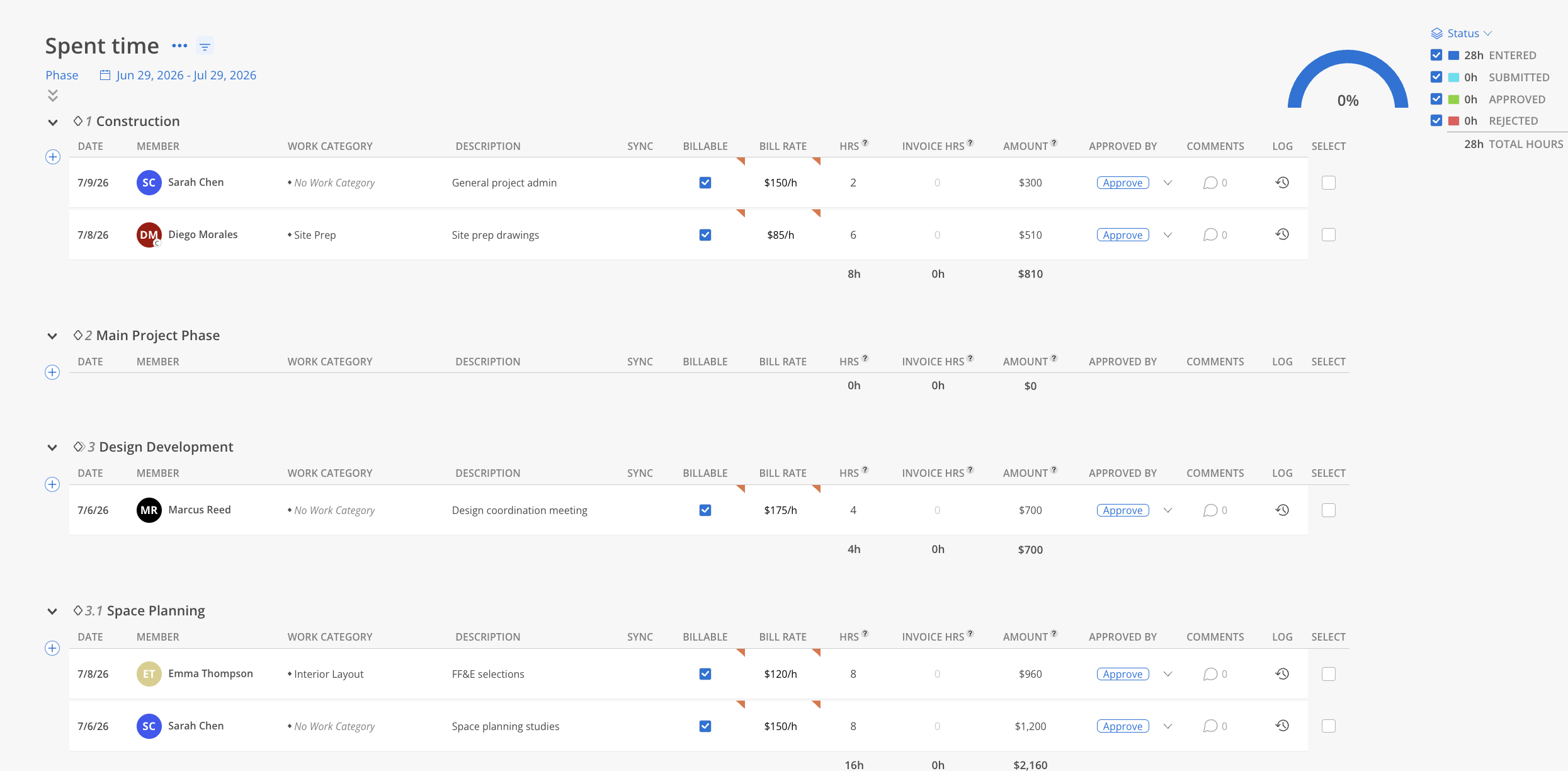
Imported rows come in as Entered time — the first status, before anything is submitted or approved — and show up anywhere Mosaic displays hours. The main places to find them:
-
Timesheets report — a cross-project log of every entry, group by Date, Member, Project, or Activity. Each row shows the date, member, project (with phase), work category, description, and billable or not; the Status panel rolls the hours up as Entered / Submitted / Approved / Rejected. From the sample, Sarah Chen's
8hon2026-07-06against Oakridge Office Fit-Out → Design Development → Interior Layout appears here with the note "Schematic layouts for level 2" and Billable checked.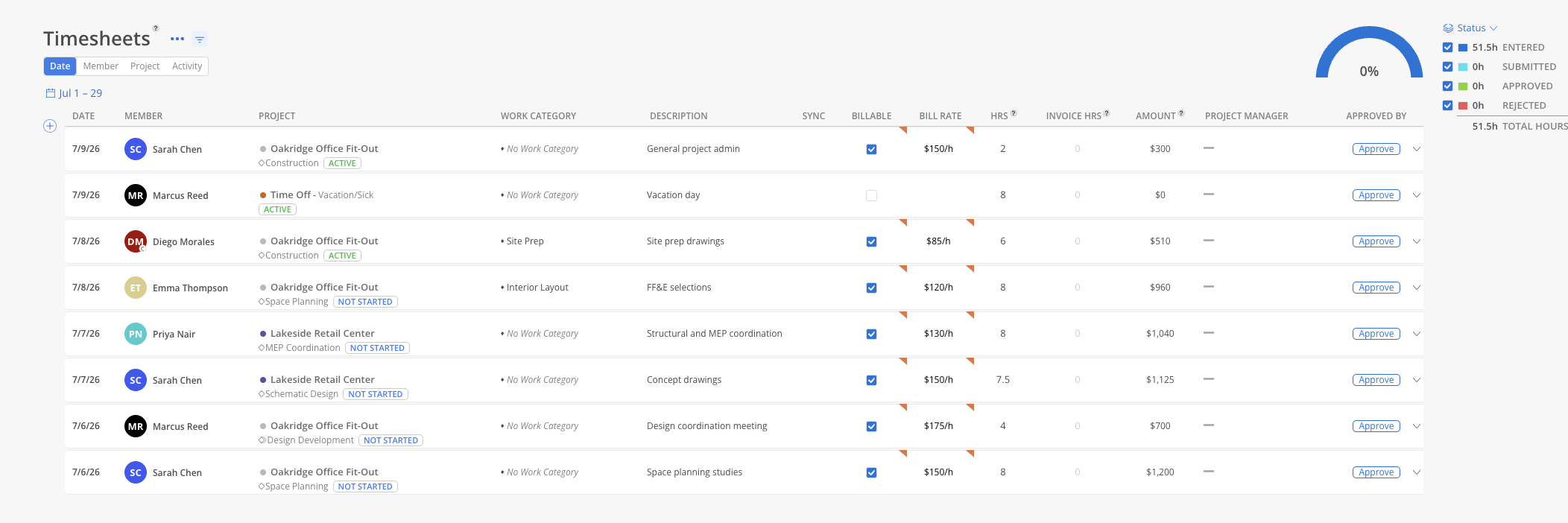
-
Project Budget Modal ▸ Spent — the same hours rolled into that project's actuals, grouped by members. Each row shows date, phase, work category, description, billable, bill rate, and hours, with a Total Hours figure that feeds the project's spent budget. On Oakridge Office Fit-Out you'd see Sarah, Marcus, Diego, and Emma's entries against their phases.
-
Member View
-
Phase View
-
Troubleshooting
| Problem | Fix |
|---|---|
| "The email address doesn't exist on Mosaic" | Add the person as a member first, or fix the email |
| "Please enter a valid date in the format of YYYY-MM-DD" | Reformat the date (e.g. 2026-07-06) |
| "Hours is required" | Every row needs a numeric Hours value |
| "Project Ref# is required when multiple projects share this title" | Add the unique Project Ref# |
| "Phase name or 'Main Project Phase' is required" | Add a matching phase, or use Main Project Phase |
| "You must enter a work category for this phase" | That phase has work categories — add a matching one |
| Time Off row rejected | Leave Portfolio and Project Ref# blank for the Time Off project |
Updated 3 months ago